
Deck plans and takeoffs in under a minute.
DeckBuild creates deck construction drawings by calculating the most cost-efficient way to build a deck, tailored to how you build, following your local code. Start to finish in about 23 seconds.
14-day free trial · No credit card
One drawing. Every deliverable.
Simply draw the outline of any deck, and DeckBuild automatically creates the permit drawings, 3D model, takeoff, plot plan, elevation view and the estimate.
Permit-ready plans.
Draw the outline of any deck and get a full plan set.
DeckBuild's Proprietary Solver
Guess less. Save more.
DeckBuild's proprietary solver automatically frames your deck dozens of different ways and outputs the most cost-efficient, code-compliant option, all in a matter of seconds. Each deck's framing is based on your costs, how you build, and to your local code. Manual override anything after if you want.
Your actual materials
Built from the materials you use at your actual costs, not generic price lists. Each deck is solved to be most cost-efficient for you.
How you actually build
Your exact footings, your post-to-beam connection hardware, your brand decking boards, your unique build methods.
Your local code
Span tables and building code for your jurisdiction and code edition. Every deck comes out permit-ready.
Defaults you can override
DeckBuild has a smart default for everything, all easily and fully customizable to the way you build.
How it works
3 steps from sketch to plans.
No pencil-and-paper math, no manually checking span charts, no spreadsheets. Create deck plans and takeoffs in under a minute, in the most cost-efficient, code-compliant way, tailored to how you build. DeckBuild handles everything.
- 01
Draw your deck
Sketch the footprint of the deck, set the deck's height, adjust picture frame and railing placements.
- 02
Add stairs
DeckBuild automatically lays out posts, beams, joists, and blocking in the most cost-efficient manner and per your local code and how you personally build decks. Override anything, you stay in control.
- 03
Export plans & takeoff
One click for permit-ready plans and itemized material and cut lists.
DeckBuild in 5 Minutes.
Watch as DeckBuild automatically turns a deck sketch into the most cost-efficient, code-compliant, permit-ready plans along with a fully itemized material takeoff, completed plot plan, 3D rendering, AI rendering, and a customer estimate and proposal.
What's inside
Built for the way you build.
Canvas drawing engine
Built for how you build.
Draw a deck once and DeckBuild turns it into a code-compliant framing plan along with an optimized cut and material list, all from the same drawing.
Explore the canvas →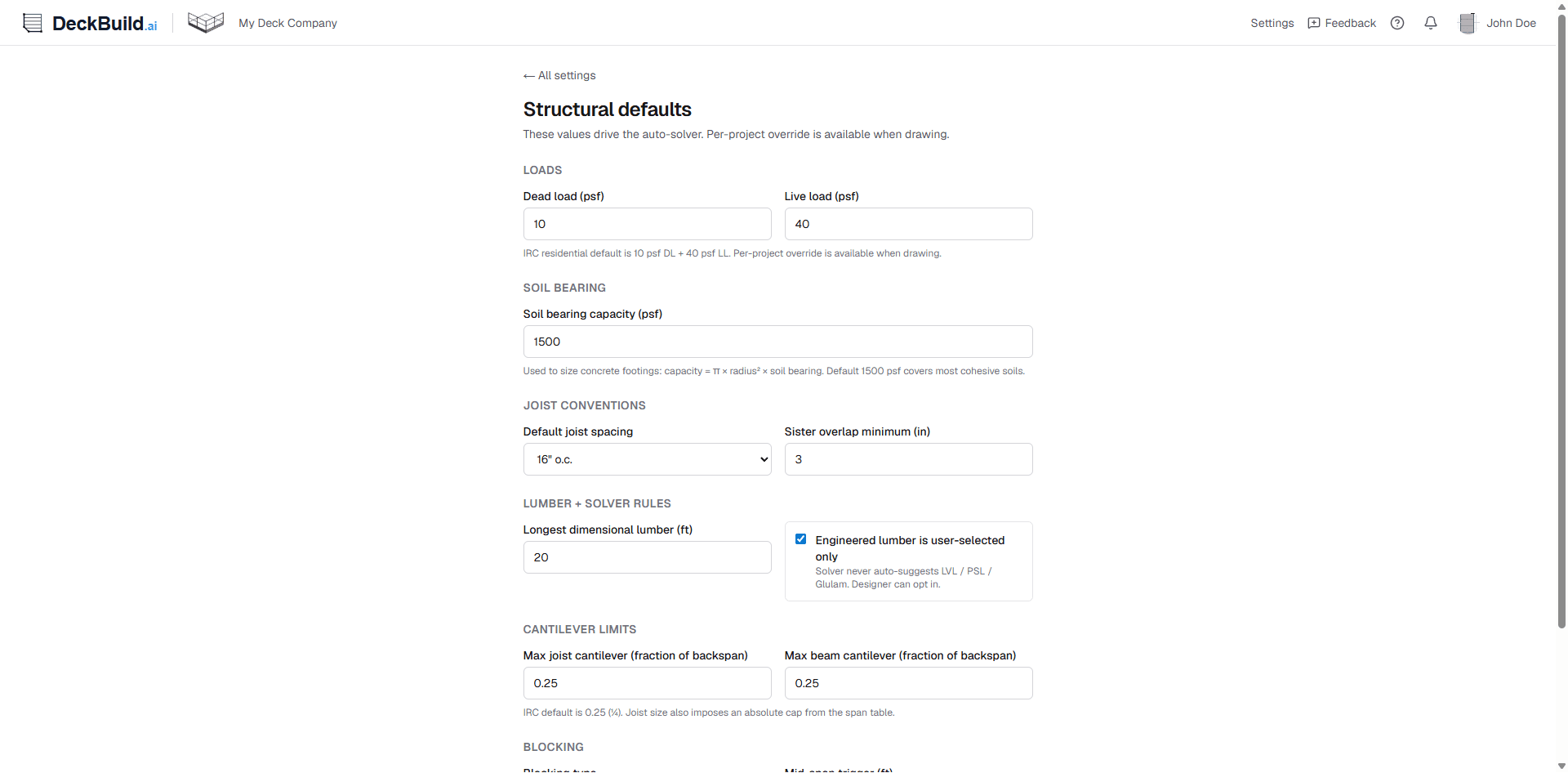
Structural auto-generation
Any deck. Any shape.
Rectangle, chamfered corners, bump-outs, multi-level decks, freestanding or ledgered. If you can build it, you can draw it and frame it in DeckBuild.
See the framing engine →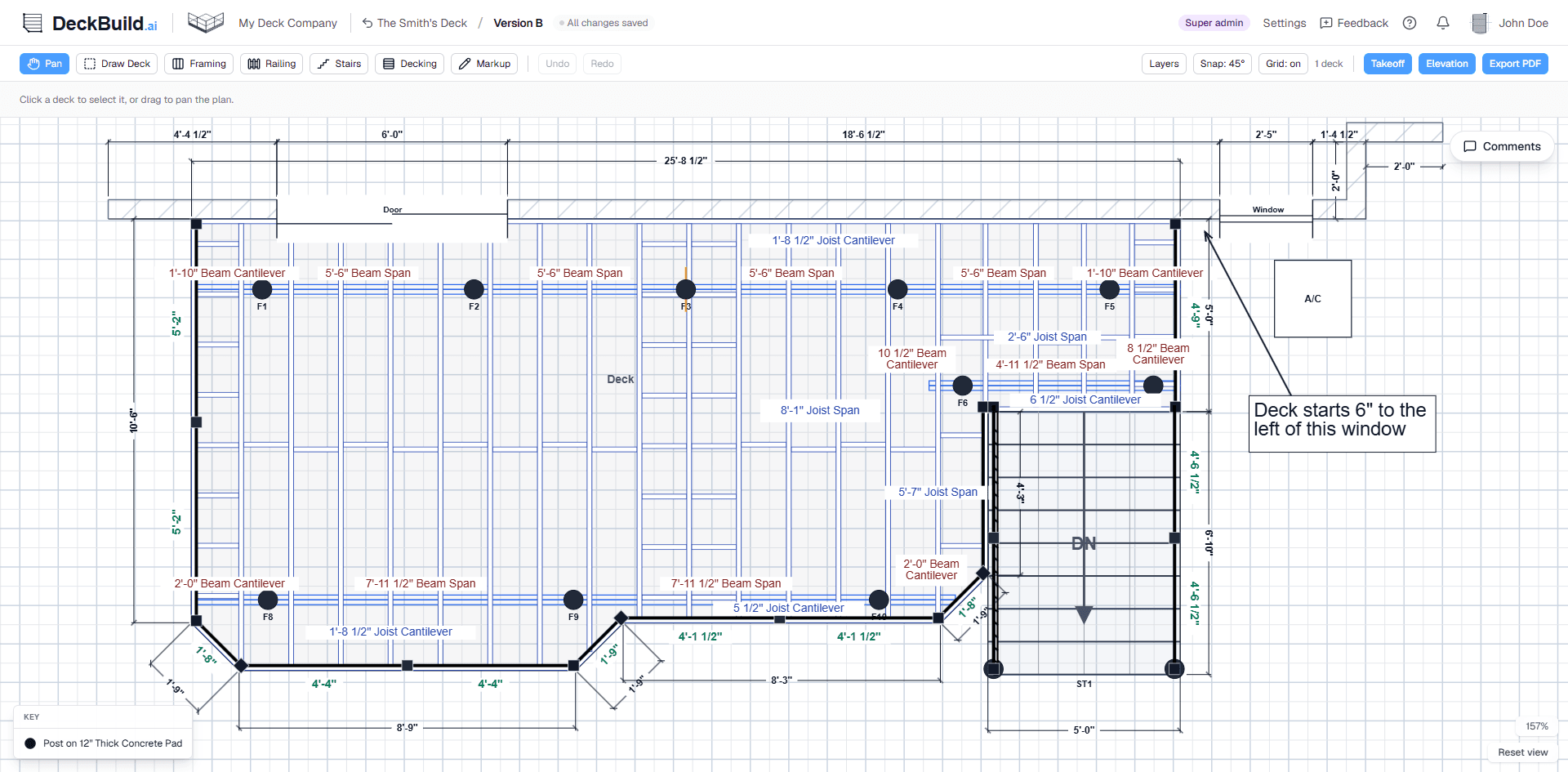
Material takeoff
Every board. Every fastener. Itemized.
From treated to composite to aluminum, cut lists and material takeoffs with exact board, joist, and beam lengths and quantities, itemized all the way down to the fasteners, customized for the material you use and how you order.
Inside the takeoff →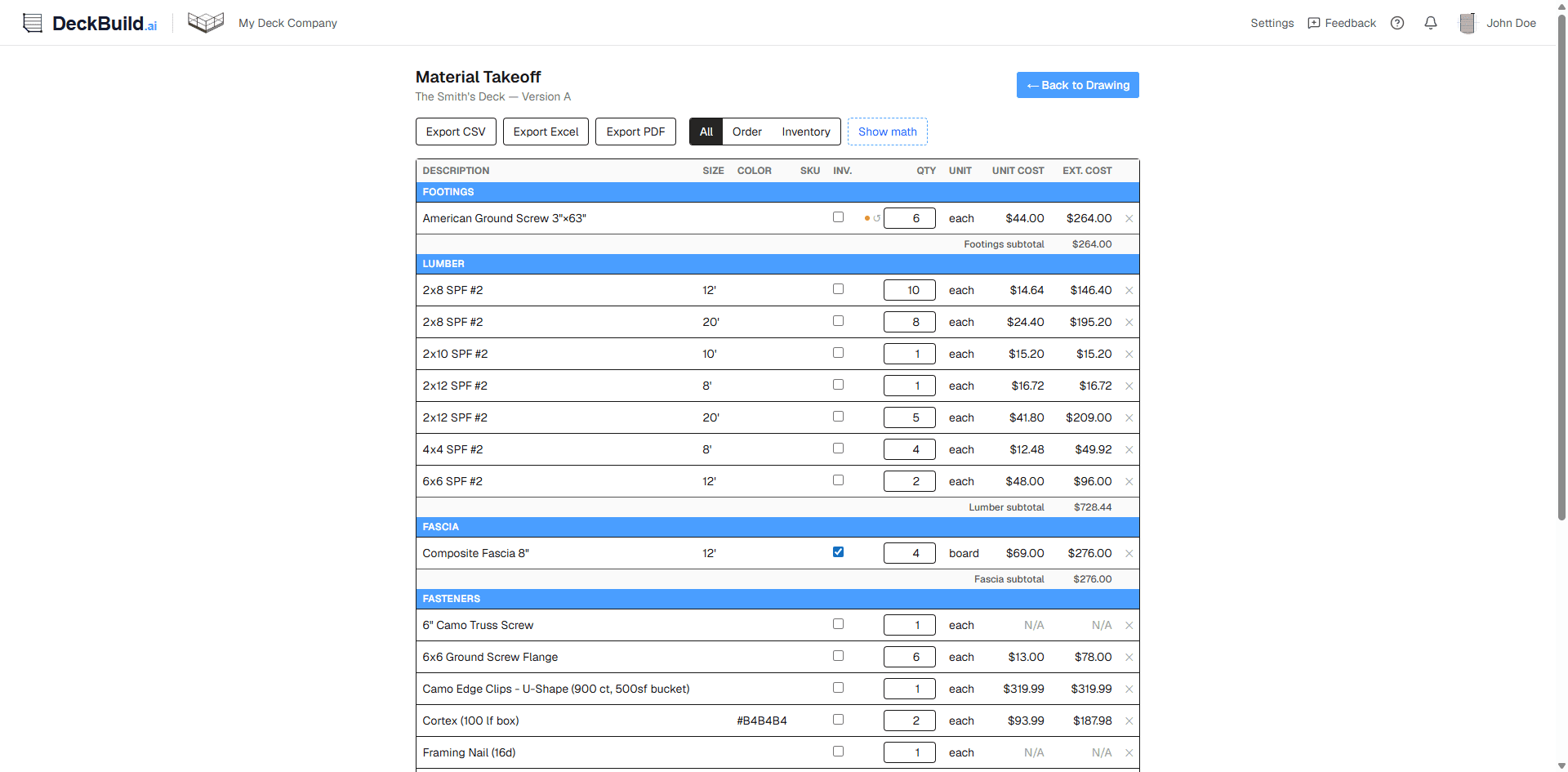
Tailored plans
Permit-ready blueprints.
Export clean PDF deck plans including plan view, elevation view, framing layout, structural load calculations, stair stringer details, and more.
See the plan packet →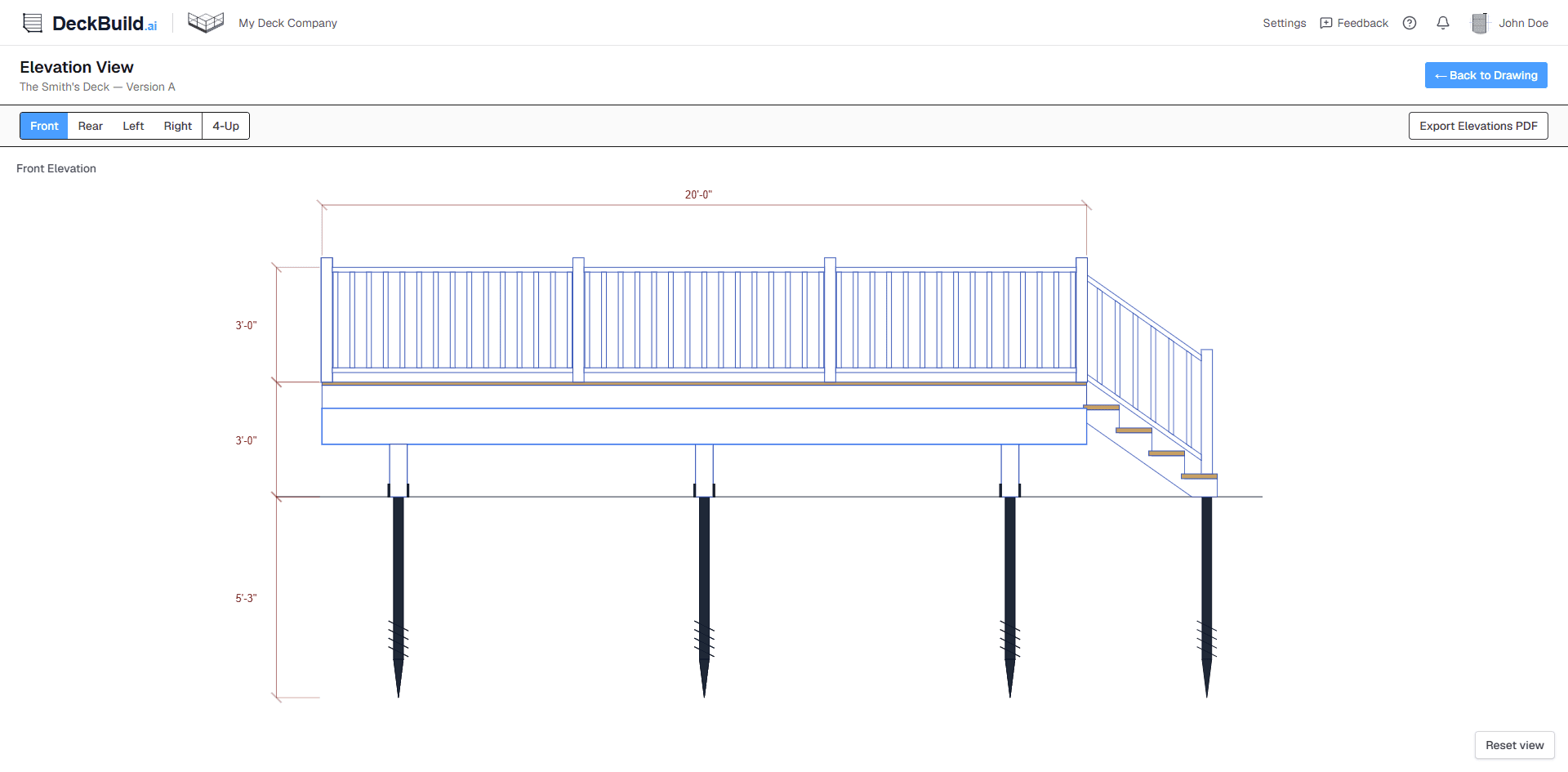
3D visualization
Show the deck. Close the deal.
Sell more decks. Every deck you draw automatically turns into a photorealistic 3D model. Walk clients through colors, railings, and finishes so that they can picture their new deck on their own house.
Explore 3D visualization →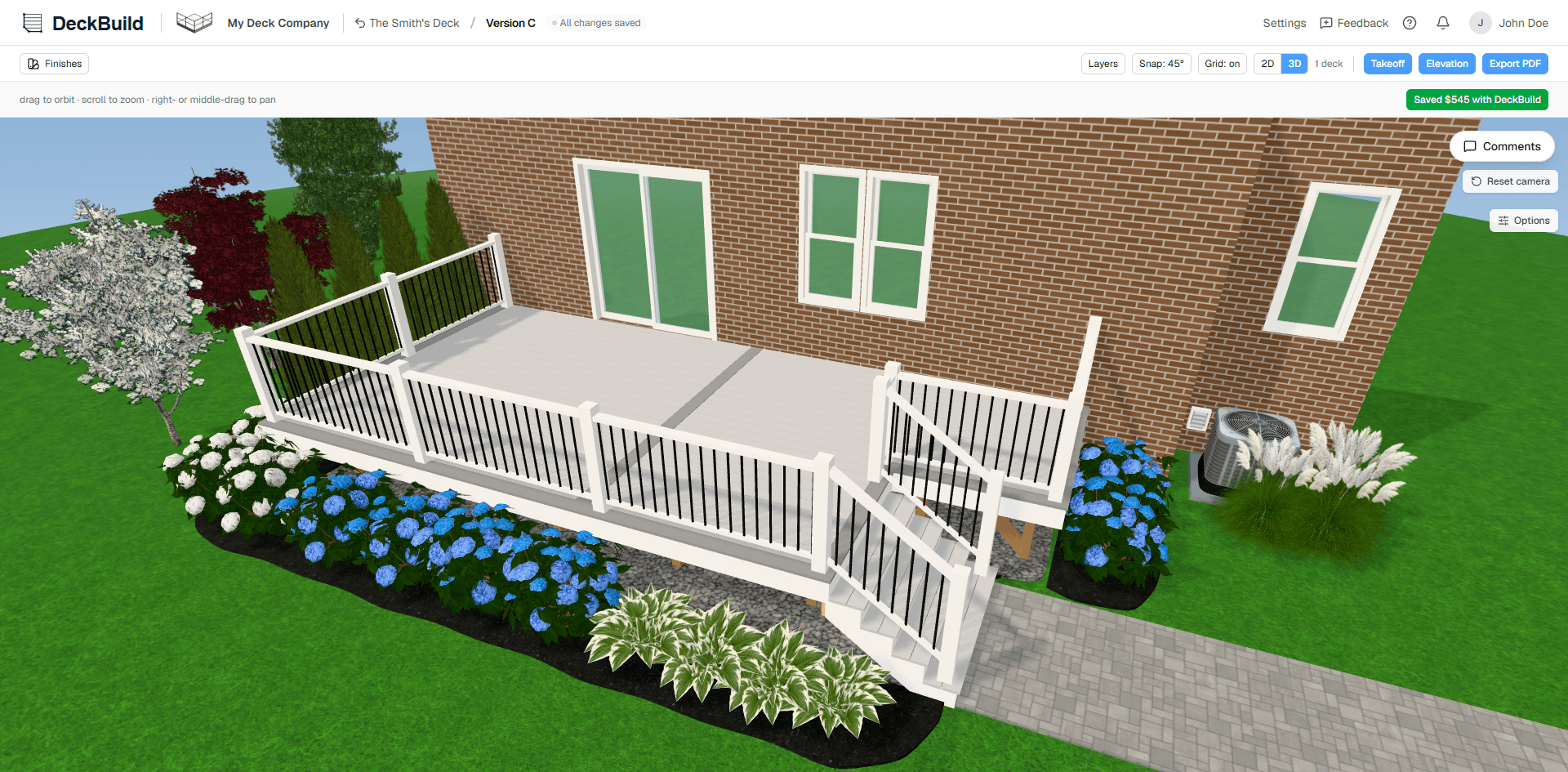
Instant estimating & proposals
Priced and proposal-ready in seconds.
The moment you draw the deck's outline, the permit-ready drawings are done, the takeoff is done, and your estimate and proposal is done. Labor, materials, overhead, commission and margin roll into a polished, client-ready proposal instantly. No more WAG (Wild Ass Guess) pricing.
See estimating & proposals →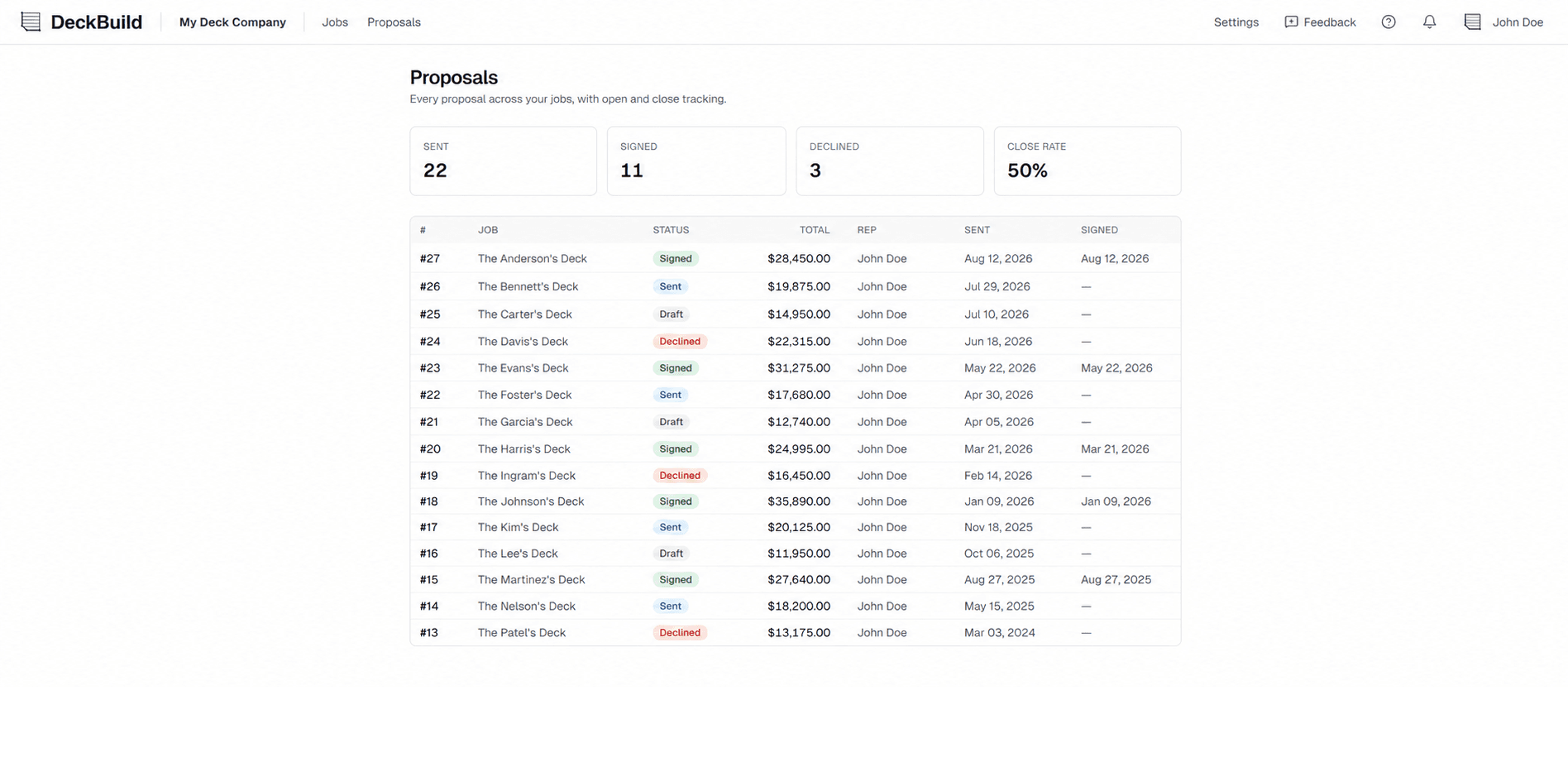
Comparison
How do you draw your decks now?
Is the “way you’ve always done it” costing you money and time? How do you know? Pencil and a pad. A spreadsheet of costs and prices. A drawing tool that doesn’t know a joist from a beam. See everything DeckBuild does that the old way can’t, from automatic code-ready framing to a takeoff that counts every screw. No more WAG (Wild Ass Guessing) your pricing.
 DeckBuild
Why DeckBuild
Stop guessing the cheapest way to build.
Pencil sketches and spreadsheet math mean overbuilding and missed materials, leaving money on the table with every deck. DeckBuild frames each deck dozens of different ways and hands you the most cost-efficient, code-compliant plan and takeoff in mere seconds.
Any of this sound painfully familiar?
- Best guess on the cheapest way to frame a deck
- Hand-check span charts for beams and joists
- Pricing a deck or generating a takeoff in a spreadsheet
- Redoing the frame/estimate/takeoff with every change
- Wrong or short on materials, burning time on extra supply runs
With DeckBuild
- Dozens of framing layouts instantly compared for you
- Span tables applied for your exact local code
- Priced on your real supplier costs
- All done automatically, in seconds
- A complete, accurate takeoff so you order material once, with no wasted supply runs
Pricing
Simple pricing that grows with your team.
For Pros
Anyone who designs or draws deck plans or creates material orders (you, your salespeople, and office staff). The first user (you/your company admin) is included free. View-only accounts are always free.
You're saving $600 a year (34%) vs paying monthly
14-day free trial · No credit card · Cancel anytime
Everything's included:
- Unlimited jobs
- Instant plans and takeoffs
- Save an average of $542/deck in material
- Export to PDF and Excel
- Customized for how you build
- Your supplier pricing & catalogs
- Works with all decking types
- Tailored to your local code
- Version history on every job
- No setup fees
- Free custom build-outs
- Save $600 a year with an annual subscription
- Priority support
- Cancel anytime
For Homeowners
Free to design · Pay only when you download · No subscription
What you get:
- Design your deck for free
- Automatic, code-aware framing
- Permit-ready plan drawings
- A complete materials list
- Export to PDF
- Up to 3 projects
- Upgrade to Pro any time
For Lumberyards, Agencies & Manufacturers
Custom terms · Apply to get started
What you get:
- Your catalog & pricing built in
- Preferred partner rates
- Connect to your system for builders to place an order directly
- Unlimited jobs
- Unlimited users option
- Optionally sponsor a network of builders
- Instant plans and takeoffs
- No setup fees
- Priority support
Straight answers
FAQs.
Do I need to be an engineer to use this?
No. Draw the deck and DeckBuild frames it for you in under a minute: the most cost-efficient, code-compliant structure, customized to exactly how you build, including your footings, your framing connections, and your methods. Because it instantly checks for the most cost-efficient layout against how you build and your local code, it saves an average of $542 in material per deck versus working it out by pencil and paper.
Are the plans permit-ready?
Yes. DeckBuild exports clean PDF blueprints including plan view, framing layout, elevation views, and a footing load schedule, all with your company branding and notes. They're built to hand to your crew or submit for permit as a prescriptive design. They're not stamped engineering (always confirm your local requirements). If needed, you can have a licensed engineer review the plans.
Are the plans code-compliant?
Yes. DeckBuild follows IRC-based residential deck span tables, tuned to the lumber species you use, how you build, how you do your footings, your local frost line, and your local code. And once the deck is drawn, you can customize anything you like: the number and placement of footings, beams, and joists; beam and joist sizing; railing, picture frame, parting board, stairs, and more. No engineering stamp or sign-off is included: DeckBuild doesn't replace a licensed design professional's review/stamp, so if your project needs that you can have them review/stamp DeckBuild's plans.
Are the plans stamped or engineered?
No. DeckBuild generates prescriptive, code-based framing plans, not site-specific stamped engineering. It applies IRC prescriptive span tables and your configurable local code settings to produce a compliant, cost-efficient frame, but you remain the builder and designer of record. Most jurisdictions don't require a stamped engineer's drawing for a permit submission when the build stays within prescriptive code limits, but permit requirements vary by state and by local building department, so always confirm with your local jurisdiction before submitting. If your design falls outside prescriptive limits, or your building department requires a stamped design for any reason, you'll need a licensed engineer to provide site-specific stamped plans.
What can I export?
Two clicks gets you everything: permit-ready PDF drawings (plan view, framing, elevations, and load schedule) plus a complete material takeoff and cut list to Excel or CSV, itemized and priced to your catalog, and branded with your logo and company info.
What kinds of decks can it handle?
Rectangles, angled and multi-level decks, freestanding or attached to the house, with stairs, railings, picture frame, parting boards, cantilevers, and cut-outs. If you can build it, you can draw it and frame it in DeckBuild.
Can I customize it to how I build?
Completely. Your footings, connection details, fasteners, blocking style, span tables, and decking and stair defaults all flow into every plan automatically, and after the deck is drawn you can override beam and joist sizing, footing type and placement, and more, deck by deck.
No really, I build totally custom and different.
DeckBuild is built for you. Footings, connections, fasteners, blocking style, span tables, framing methods, decking and stair defaults, beam and joist sizing: all of it is configurable to match exactly how you build, not a generic template. If you run into something genuinely unique that isn't already configurable, tell us. We'll work with you to build it out at no charge.
Will it match the materials I use?
Yes. Whether treated, composite, or aluminum, DeckBuild builds the takeoff from your SKUs, your costs, and your stock lengths, all the way down to the fasteners. No "misc hardware" bucket and no guessing.
Can I use my own lumber prices and suppliers?
Yes. Set your supplier pricing and catalogs once and it flows into every takeoff. Quotes reflect what you actually pay, not a generic national average.
Can my whole team use it?
Yes. Invite admins, designers, and salespeople for estimating and proposals, plus unlimited free view-only accounts. Company-wide defaults for your span tables, build methods, supplier catalogs, and branding keep every estimator's plans consistent, so your whole team's work matches.
What type of computer skills do I need?
If you can draw a deck with a pencil, you can draw a deck on DeckBuild, in under a minute, with no training or experience. It's just that easy. DeckBuild runs in any modern browser; use it in the home with a client or back in the office.
How does the free trial work?
For Pros: 14 days of full access, no credit card up front. Build real plans during the trial. If you don't subscribe by the time it ends, your projects simply become read-only. Every drawing and takeoff stays safe in your account, and the moment you subscribe you're editing and exporting again right where you left off.
Homeowners don't need a trial. Designing your own deck is free, and you only pay a one-time fee per project when you're ready to unlock the material takeoff and export the plans.
Lumberyards, agencies, and manufacturers can partner with DeckBuild to put the tool in front of the Pros and homeowners they already serve.
Your next deck plans & full takeoff could take 23 seconds.
Start your free 14-day trial, draw a real deck, and watch DeckBuild create full deck plans and a full material takeoff and cut list in real-time. No credit card required.