
Canvas drawing engine

Draw any deck. Exactly the way you'd build it.

DeckBuild's canvas is a drawing tool built by deck builders, not a general-purpose CAD program. DeckBuild knows how you build and saves you money on every deck. The learning curve is measured in minutes, not weeks.

14-day free trial · No credit card

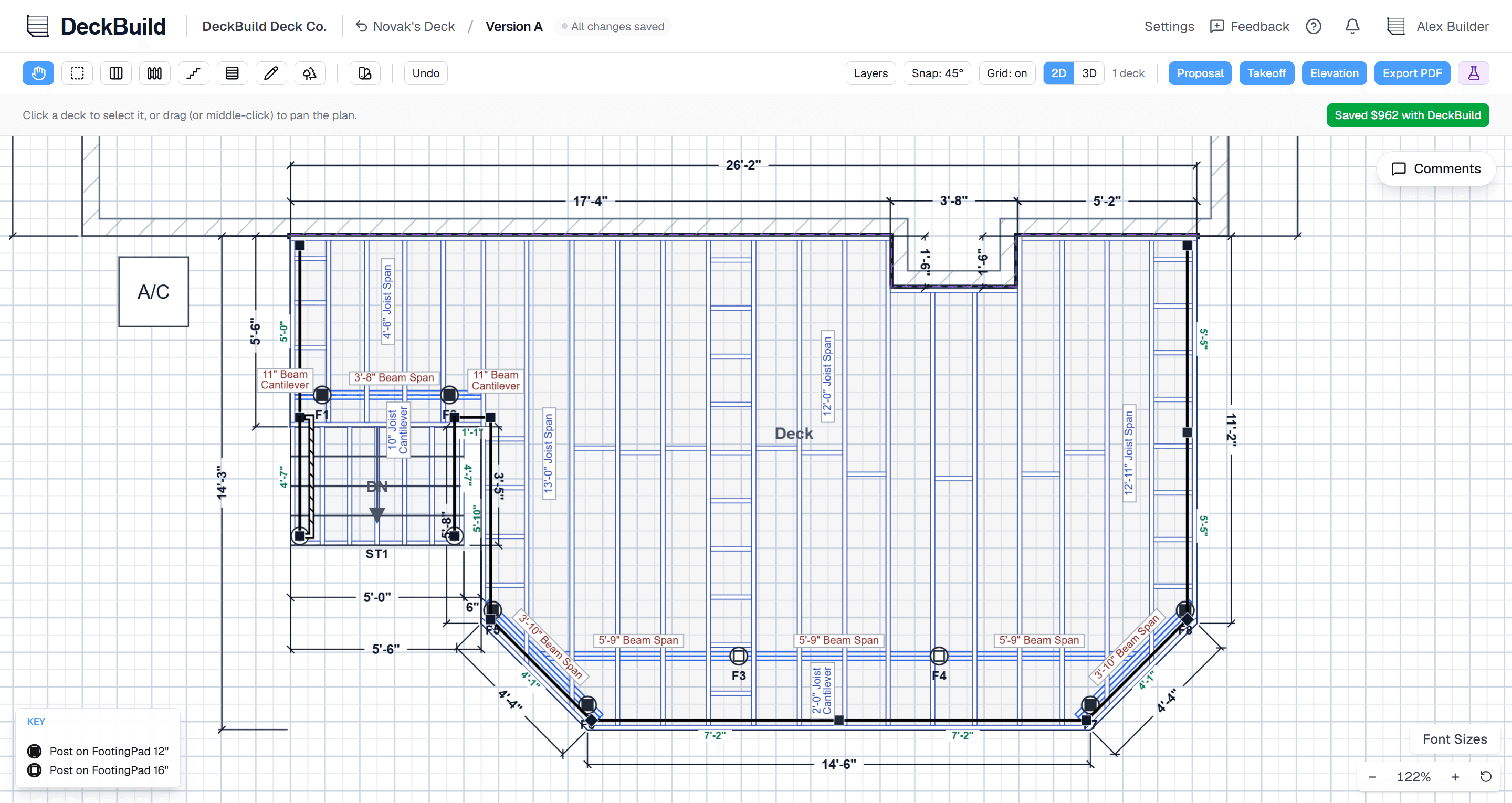
The DeckBuild canvas: a deck footprint being drawn with live dimensions
InstantlySee the full deck plan at once, ready for permit and building
AccuratelySmart defaults out of the box, fully configurable when you want it
Any shapeL-shapes, notches, bump-outs, 45° chamfers, multi-level

The drawing tool

A canvas that speaks deck.

Every tool on the canvas is built around how a deck actually goes together, so the drawing is field-accurate from the very first click.

Draw any footprint

If you can build it, you can draw it.

Sketch the outline corner by corner: L-shapes, notches, bump-outs, freestanding or ledgered against the house. Drag a corner to chamfer it to 45°, and type the exact edge length instead of eyeballing a drag. Everything lands on a clean.

Smart snapping & live dimensions

Guides light up exactly where you need them.

The canvas snaps to the grid, to clean angles, to house edges, to your other decks, and to footing lines, so edges land square without fighting the cursor. Every edge, joist, beam, and railing dimension places itself automatically, with leader arrows that route around each other instead of piling up.

Multi-deck, multi-level & resurface

One drawing for the whole project.

Draw multiple decks that snap flush together and step up or down in level, all on the same plan. Re-decking an existing structure? Resurface mode lets you quote a re-deck against the surface without re-framing what's already standing.

Everything on the plan

The whole backyard, not a floating deck.

Trace the house

Anchor the deck to the real house.

Trace the house wall and add doors, windows, basement doors/windows, A/C unit, and vents, so the deck relates to the structure it actually attaches to. Change deck edges to ledger and the framing automatically adjusts.

Stairs, railings & gates

Details on any edge.

Run railing along any edge, drop stairs off any side, and place gates with a hinge post and swing direction. Cocktail rail caps are one toggle, on the deck or the stairs.

Landscaping

Sell the setting.

Add trees, bushes, mulch beds, stone, walkways and decor. Mulch and stone beds even auto-wrap around the deck with clean curves, so the plan shows the finished backyard.

Markup & annotations

Say it right on the plan.

Drop text notes, arrows, and manual dimensions anywhere on the drawing. Call out a detail for the crew or the inspector without leaving the canvas.

Work fearlessly

Draw on the phone, in the backyard, with nothing to lose.

The full editor works on a phone or tablet, with a touch toolbar, pinch zoom, and type-to-place measurements, so you can rough out the deck standing in the customer's yard while the sale is hot. It autosaves as you go and commits when you're ready, so you can roll back anytime.

  • Full touch editing on phone & tablet
  • Autosave as you go, commit when ready, roll back anytime
  • Rough out the deck in the yard while the sale is hot

Straight answers

Questions about the canvas.

Do I need CAD experience to draw a deck?

No. If you can draw a deck with a pencil, you can draw one in DeckBuild. The canvas snaps to clean angles and house edges for you, and you type exact lengths instead of dragging precisely, so the drawing is accurate without any CAD skills or training.

What deck shapes can it handle?

L-shapes, notches, bump-outs, 45° chamfered corners, multi-level, and multiple decks that snap flush together, freestanding or attached to the house. If you can build it, you can draw it.

Can I really design on my phone?

Yes. The full editor works on a phone or tablet with a touch toolbar, pinch zoom, and type-to-place measurements. It's the real editor, not a read-only view, so you can draw and show a client on the spot.

Will I lose my work if I make a mistake?

No. DeckBuild autosaves as you draw and lets you commit a version when you're happy with it, so you can roll back to an earlier state anytime. There's also a guided walkthrough with a practice sandbox deck to learn on.

Draw your first deck in the next few minutes.

Start your free 14-day trial, sketch a real deck on the canvas, and watch DeckBuild turn it into a framed, dimensioned plan in real time. No credit card required.